
It's 7:00 p.m., and you still have a quote to send. You open ChatGPT, paste in the client's name, ID number, address, and account number, and ask it to prepare the document for you. In two minutes, it's ready.
It's convenient, and a lot of people do it. But that data isn't yours—it belongs to your customer. And you've just sent it to a third-party company without your customer's knowledge.
In this article, we'll explain what really happens to the messages you send to a chatbot, what the Spanish Data Protection Agency recommends, and how you can continue using AI in your work without putting your customers at risk.
What about what you type into a chatbot?
Everything you type into a chatbot is sent to the servers of the company that provides it. There, it may be stored in your chat history and, depending on the settings, used to train their models.
In ChatGPT, for example, the use of your conversations for training is enabled unless you turn it off. It is disabled in Settings → Data Controls → Improve the Model for Everyone. Keep an eye out for two details:
- This only affects new conversations. What you wrote earlier remains unchanged.
- Your chats are still saved in your chat history, even though they are no longer used for training.
The risk is not just theoretical. In 2024, the Dutch data protection authority reported that it had received several reports of data breaches caused by employees who had pasted customer or patient data into a chatbot.
What the AEPD Says
The Spanish Data Protection Agency makes it clear: do not share personal data or sensitive information with AI. In January 2026, it published the ten-point guide «Be careful what you confide in him», with recommendations on how to use these tools safely.
Among his tips:
- Do not include any information that could identify anyone: full name, address, phone number, ID number (DNI or NIE), or photos of people.
- Do not share sensitive information: medical, financial, or contractual data.
- When you need help with a real-life case, describe it as if it were fictional, with no details to indicate who the person is.
The Agency warns that these practices could result in a data protection violation. And if you're self-employed, remember that you're responsible for your clients' data: if you paste it into an external tool, the responsibility still lies with you.
What Data You Should Never Paste
If you work with clients, here's a list you'll want to keep handy:
| Data type | Examples |
|---|---|
| Identification | National ID, Foreign Resident ID, Tax ID, passport |
| Bank Employees | IBAN, card number |
| Contact | Phone number, email, address |
| Health | Diagnoses, sick leave, treatments |
| Contracts and Money | Pay stubs, debts, contract amounts with names |
| Images | Photos or screenshots that show people or documents |
The rule of thumb: if that piece of information could let someone figure out who you're talking about, don't post it as is.
5 Habits for Using AI Without Compromising Your Customers' Privacy
There's no need to stop using AI. You just need to change the way you use it a little.
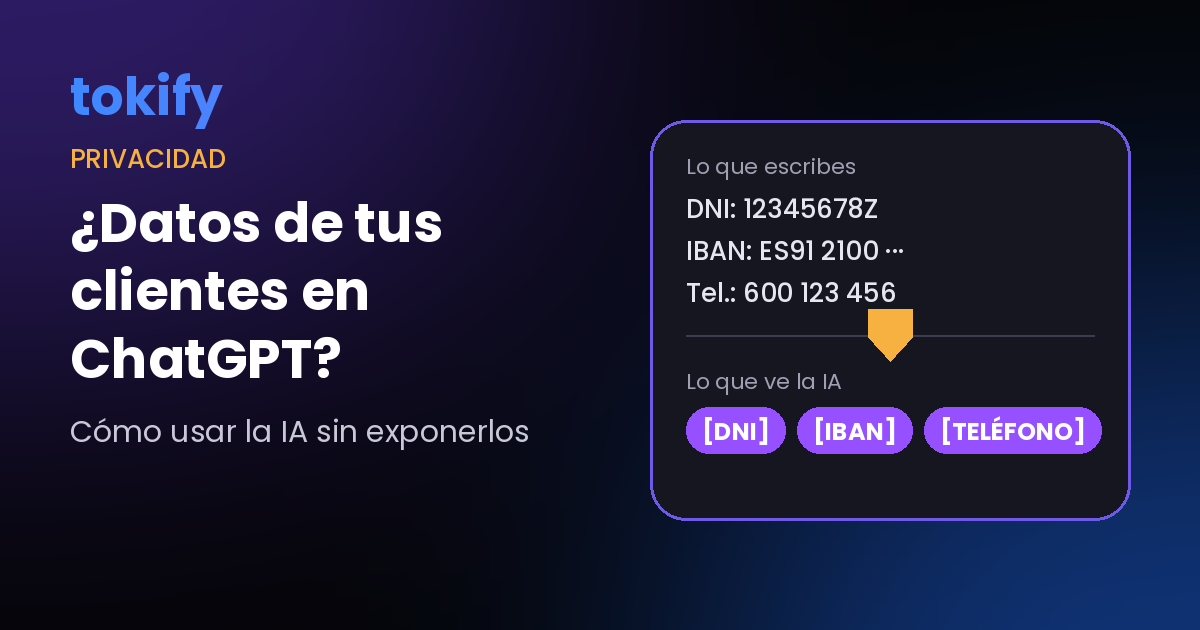
- Replace the actual data with placeholders. Instead of «Juan Pérez, ID No. 12345678Z,» write «[CUSTOMER], [ID No.]». The AI will draft the text just as well, and you can fill in the details later.
- Describe the case, not the person. «A customer who owes me three invoices» is all it takes for the AI to help you draft a payment reminder. It doesn't need to know who the customer is.
- Turn off training based on your conversations. In ChatGPT, under "Data Controls." If you're using a different tool, look for a similar option.
- Use a mode that doesn't save anything for the most sensitive topics. In ChatGPT, it's called «Temporary Chat»: the conversation doesn't appear in your history.
- Check before sending. Before pressing Enter, double-check to make sure you haven't accidentally pasted a phone number, email address, or account number. It's the most common mistake when copying and pasting.
How We Handle It at TOKIFY
At TOKIFY, we wanted the tool to handle the part that's easiest to forget for you.
- Privacy Shield. Before your message reaches the AI, TOKIFY automatically detects and hides ID numbers (DNI, NIE, CIF), IBANs, card numbers, email addresses, and phone numbers. It also hides the most common identification documents in Latin America, such as RFC, CURP, CUIT, or RUT. The AI works with tags, and you see the response with your information already filled in.
- Private mode. With one click, the conversation isn't saved. When you close it, it disappears.
- Encrypted history. If you'd rather save your chats, they're stored in encrypted form, and you can delete them whenever you want.
Let's be clear: the shield hides that specific information, but not the names or descriptions you enter. If you type «my client Juan Pérez, from Calle Mayor,» that actually gets through to the AI. That’s why the tips above are still useful, even with TOKIFY.
In summary
Using AI at work is safe as long as you use it wisely. Don't include data that identifies your customers; describe cases without using names; and choose tools that protect your information by default.
If you want to try it out, TOKIFY has 200 free credits when you open the chat for the first time. No subscription, no credit card required to get started, and privacy shield enabled from the very first message.
This article is for informational purposes only and is not a substitute for legal advice.
 Español
 English
 Português do Brasil