
Do you have a business but no website? Or do you have one that nobody updates? Many freelancers and small businesses sell through WhatsApp and Instagram, but they lack a simple place to showcase their products, prices, and hours—and where someone can answer customers’ questions even at 11 p.m.
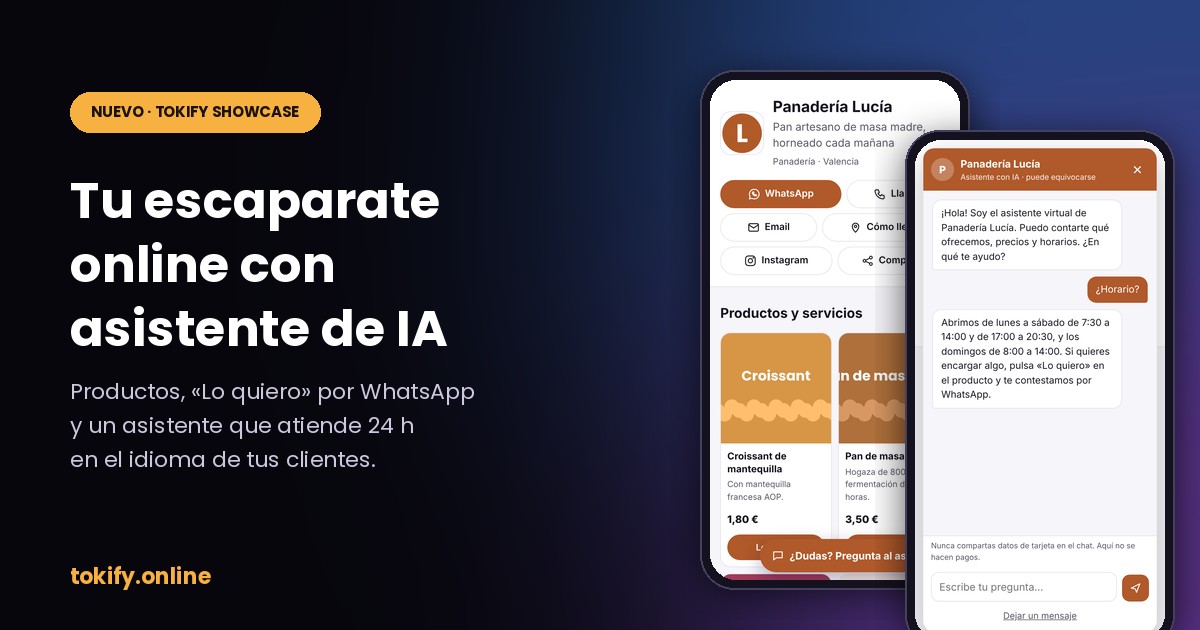
That's why we've created Tokify Showcase: a An online storefront for your business, featuring your products and an AI assistant that serves your customers in their own language.
What is Tokify Showcase?
It's a website for your business with its own URL, for example tokify.online/s/tu-negocio. You create it from your TOKIFY dashboard by filling out a form: no templates, no coding, and no struggling with any editor.
The following appear on your page:
- Your logo, your name, and a phrase that sums up what you do.
- Up to 12 products or services, with a photo, description, and price. The price may be fixed, “starting at,” hourly, per kilo, per person, or “price upon request.”.
- Contact Buttons: WhatsApp, phone, email, directions, and Instagram.
- Your schedule and a presentation of your business.
- An AI assistant that responds to your customers.
You can see a real-life example on our own website: tokify.online/s/ia-prepago.
The «I Want It» Button: Direct Orders to Your WhatsApp
Each product has a button «I want it». When a customer taps it, WhatsApp opens with a pre-written message: the product, the price, and a link to your page. You receive the order on your regular WhatsApp and complete the sale however you prefer.
If you don't use WhatsApp, the button opens a form, and you'll receive the message by email. It's also saved in your dashboard, under the Orders tab.
TOKIFY does not charge your customers or take a percentage of your sales. You handle the billing yourself, just as you have been doing.
A 24-hour support representative who speaks each customer's language
The assistant knows your products, your prices, your hours, and whatever else you tell it: shipping, payment methods, orders, allergens, warranties… If a customer asks, “Are you open on Sunday?” or “Do you offer shipping?”, the assistant responds right away—even if you’re asleep.
Respond in the language in which they write to you. If a tourist visits you and asks a question in English, French, or German, answer them in their language.
Plus, it's designed to keep you out of trouble:
- It indicates that it is an AI. He's not pretending to be you.
- He doesn't make things up. If something is missing from your information, it will let you know and offer to leave you a message.
- It doesn't charge you or ask for your credit card information. To make a purchase, direct the customer to your WhatsApp or the form.
- Just talk about your business. If someone tries to use it for something else, they won't be able to.
Share it on your social media and via a QR code
From the Share tab on your dashboard, you'll find:
- Your link, for your Instagram or TikTok bio, your WhatsApp status, or Google Maps.
- A QR code Downloadable, so you can print it for your counter, storefront, business cards, or bags.
- Texts Ready to Copy, including an automated response for WhatsApp Business in Spanish and English.
And in the Statistics tab, you can see how many visits you receive, how many «I want it» clicks, how many WhatsApp messages, and how many inquiries the assistant answers—all without storing your visitors’ personal information.
How much does it cost?
There is no monthly fee to publish your storefront. The only requirement is that you have purchased at least one TOKIFY credit pack. We require this to prevent fake or fraudulent pages, and packs start at €5.
The assistant uses credits from your account only when it responds. A response typically costs between 1 and 5 credits, so with the Basic Pack (5,000 credits), you’ll have enough for more than a thousand responses. You set a daily spending limit, and if it’s reached, the assistant pauses until the next day, and we’ll notify you by email. Your customers can still message you via WhatsApp or through the form.
Insurance for You and Your Customers
- Your page does not use cookies follow-up.
- The footer displays your name or business name and your tax ID number, as required by law for any business website.
- Each page has a button to report abuses, and we review and remove pages that impersonate other companies.
How to Create Your Storefront in 10 Minutes
- Log in to your TOKIFY account and open the tab Showcase from the panel.
- In My Business, enter your name, upload your logo, and add your WhatsApp number and contact information.
- In Products, add your products or services with a photo and price.
- In Assistant, tell them what they need to know: shipping, payment methods, orders…
- Click Post and share your link.
Don't have an account yet? Create it for free and you'll receive free credits to try TOKIFY. When you're ready, Choose your package and publish your storefront.
 Español
 English
 Português do Brasil